
Batch Actions
Through the notification list, massive actions can be performed.
To enable this feature, we must click the highlighted button in the top right corner: 
Once the button is clicked, the possible actions to be performed will be displayed. After selecting any of these actions, we can begin selecting notifications from the list.
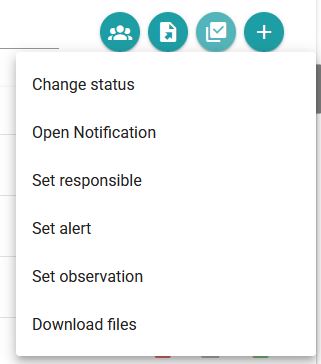
Mass actions allowed
Change status
Allows you to change the status of various notifications. Available statuses are ‘Completed’, ‘In Process’, ‘Pending’ and ‘Accepted’
Open notification
Allows you to open multiple notifications at once.
Establish responsible
A responsible party can be set for multiple notifications. Notifications cannot be selected where the operator, due to their filters and selected companies, cannot be held responsible.
Set alert
The same alert can be set on multiple notifications. Notifications cannot be selected where an alert is set.
Additionally, a multi-event .ics file can be exported to incorporate all generated alerts into any calendar that supports this format (Outlook, Google Calendar, etc.).
Set observation
The same observation can be set in multiple notifications. Notifications where an observation has been set cannot be selected.
Newsletter susbcribe
Receive all the news and updates about GoodOK in your email.