
Administrator Permissions
Operators with administrator permissions are distinguished in the list because they have a crown in the permissions section:

Administrator permissions can be activated when creating the user or at any time later. Checking the Administrator Permissions option opens a set of administration permissions options under the Administration Roles heading.
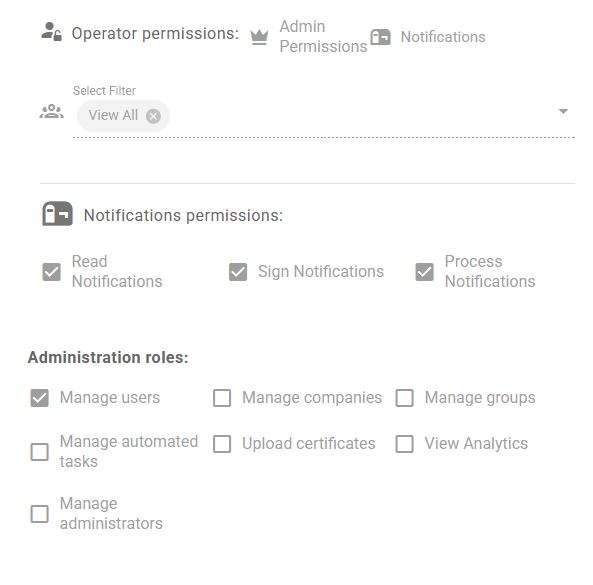
The permissions that can be assigned are:
- Manage Users: The operator with these permissions can manage operators: create, configure, disable for services, but cannot grant or manage administrator permissions.
- Manage companies: The operator with these permissions can manage companies: create, configure and delete companies.
- Manage Groups: The operator with these permissions can manage groups: create, configure and delete groups. Assign companies and operators to groups within the Groups tab.
- Manage automatic tasks: The operator with these permissions can manage automatic tasks in the Automatic Tasks tab (create, modify or delete).
- Upload certificates: the operator with these permissions can upload electronic certificates and their password to the platform that are used to obtain notifications and appear at them.
- View Analytics: the operator with these permissions can consult the application’s analytics panel in the Analytics section under the Management menu.
- Manage Administrators: The operator with these permissions can grant and remove administrator permissions to other operators. Operators with this permission have all previous permissions enabled as well.
An operator who belongs to a Group can only have administrator permissions to Manage users (and only those who are in their Group), Manage companies (and only those who are in their Group), Upload certificates and View Analytics. The other permissions cannot be configured as they exceed the scope of the Group to which the operator belongs.
Newsletter susbcribe
Receive all the news and updates about GoodOK in your email.