
Beta functionality available soon
Substitution Mode
GoodOk allows operator administrators to schedule absences where one operator is replaced by another for a set period.
When an operator acts as a substitute, they receive copies of emails sent to the replaced operators, marked with the label “Substitution Mode” to indicate their role.
When logging into GoodOk, a substitute operator initially sees their own notifications and options. However, a banner appears at the top of the screen, indicating that they are acting as a substitute for one or more operators, displaying the names of those they are replacing.
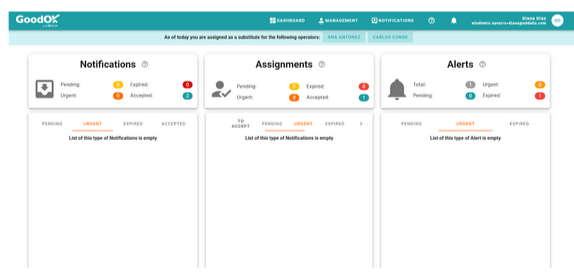
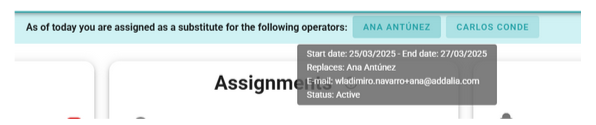
By hovering over the names of the operators being replaced, you can view the details of the substitution period.
By clicking on the name of any replaced operator, the view switches to their panel and notifications.
A red banner appears, indicating that the user is acting in Substitution Mode for the mentioned operator. Additionally, the replaced operator’s name is highlighted in green within the substitution banner.
Instead of our own details, the replaced operator’s information is displayed in the upper corner.
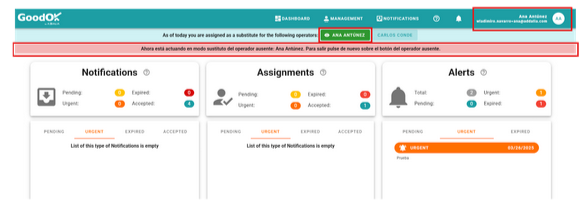
In Substitution Mode, only the PANEL, NOTIFICATIONS, language change, and light/dark mode options are available.
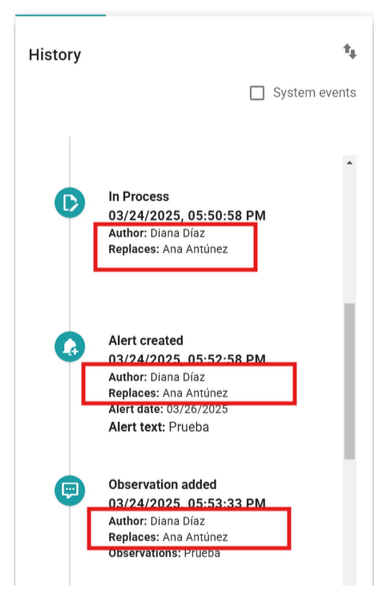
When actions are performed on notifications in this mode, the history records that the substitute operator carried out the action on behalf of the replaced operator. This ensures that it is always clear who performed the action and whether it was done as a substitute for someone else.
Newsletter susbcribe
Receive all the news and updates about GoodOK in your email.