
Creation Task
Automated tasks can be created by GoodOK users by accessing the list. To access this list, click the button with the highlighted robot icon shown in the following image.

Once in the menu, we must click the highlighted icon shown in the following image to create a task.

Once the button is clicked, we will see a dialog box that allows us to configure our automated task.
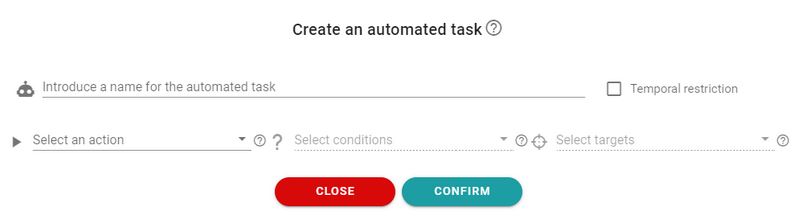
The first step in creating an automated task is to assign a name. Then, we must select the action that the task should execute. Note that in order to select conditions, an action must be selected first. This is because conditions depend on actions. By clicking ‘Select an action’, all available actions will be displayed.
Once an action is selected, we can choose the conditions that must be met for the task to execute the action. You can select as many conditions as desired, and these conditions will always be accompanied by additional data. If multiple conditions are entered for the task to execute, all of them must be met.
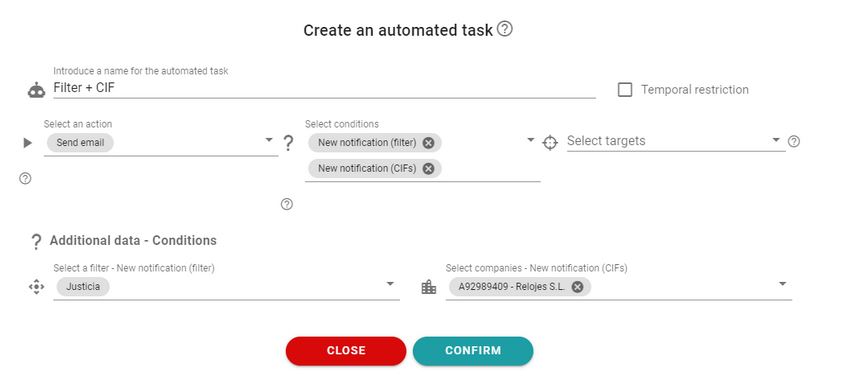
The above image shows a task with two conditions: the new notification belongs to the ‘Justice’ filter and it is a notification from the company ‘Relojes S.L.’ In this case, the automated task will only be executed when both conditions are met, so it will only be executed when notifications of type ‘Justice’ from the company ‘Relojes S.L.’ are received.
Automatic tasks can have temporal restrictions by checking the ‘Temporal Restriction’ checkbox. Once checked, two inputs are displayed where we can enter: first, the date from which we want the task to start executing, and second, another date until which we want the task to continue executing.
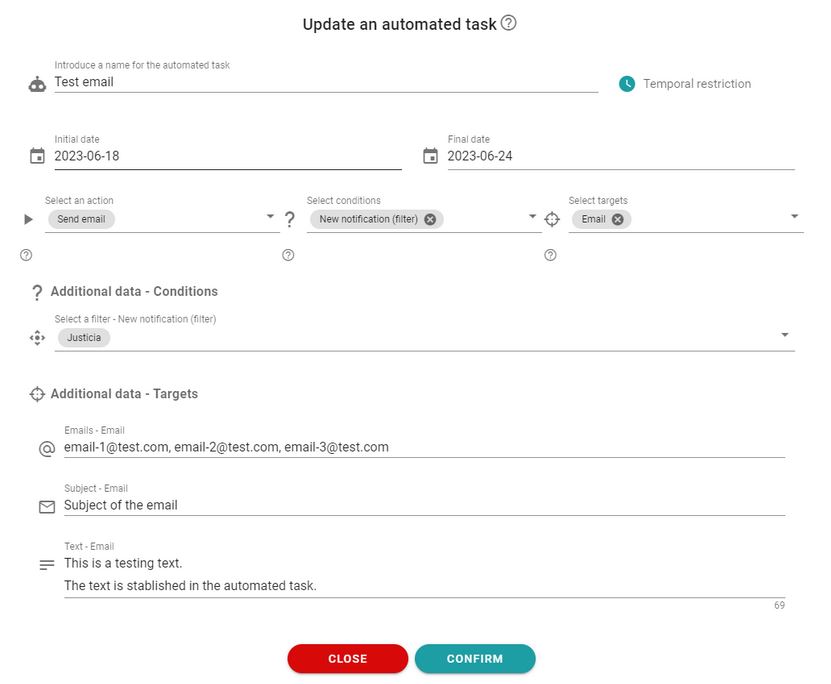
To finish creating a task, we must choose an objective. It is important to choose the conditions and add the additional data before selecting an objective because objectives depend on conditions.
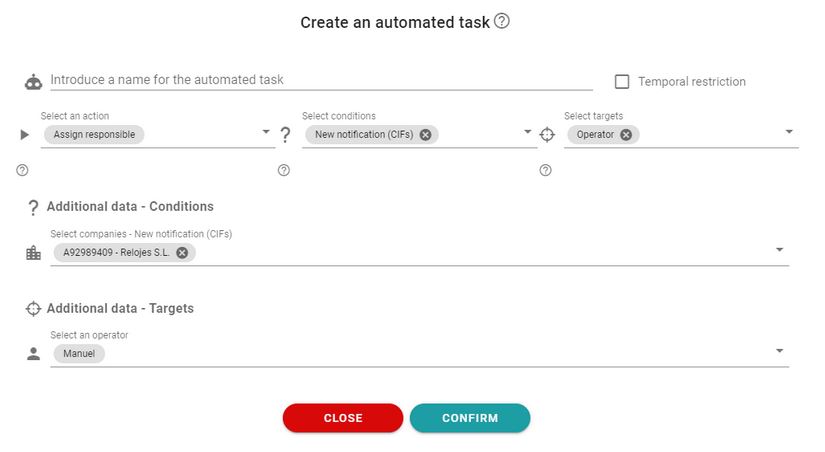
When setting text in a target, you can use ‘tags’ that will be replaced with subject information. If the subject is a notification, you can include notification data.
To set a tag, enclose the text in curly braces:
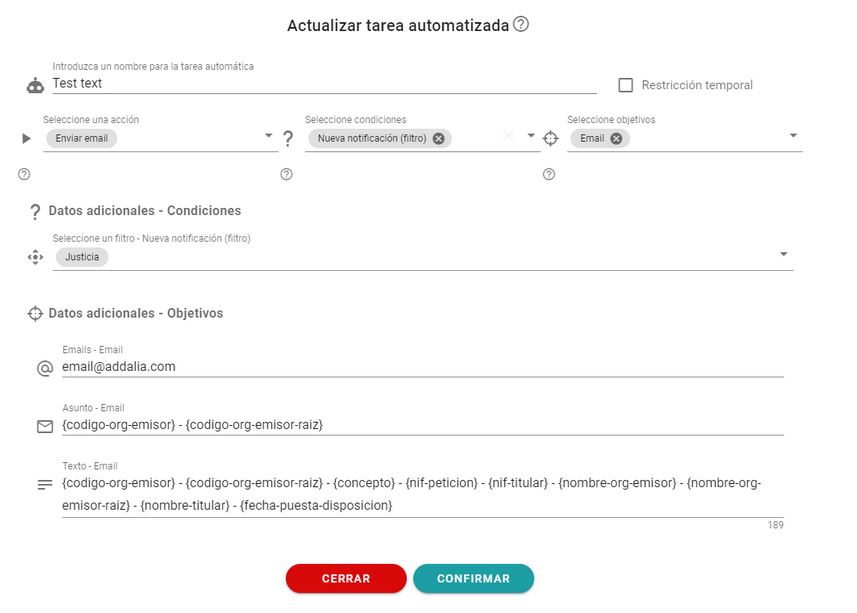
The available tags are:
– {id}: Id of the notification.
– {codigo_organismo_emisor}: Code of the sender organization of the notification.
– {codigo_organismo_emisor_raiz}: Root code of the sender organization of the notification.
– {concepto}: Concept of the notification.
– {nif_peticion}: Tax identification number of the requester.
– {nif_titular}: Tax identification number of the holder.
– {nombre_organismo_emisor}: Name of the sender organization of the notification.
– {nombre_organismo_emisor_raiz}: Name of the root sender organization of the notification.
– {nombre_titular}: Name of the notification holder.
– {fecha_puesta_disposicion}: Date when the notification was made available.
– {metadata.referencia}: Notification reference.
– {metadata.importeAPagar}: Amount to pay.
– {metadata.totalAIngresar}: Total to be paid.
– {metadata.codigoSeguroVerificacion}: Secure verification code of the notification.
– {metadata.fechaVencimiento}: Request date.
– {metadata.baseSancion}: Sanction base.
– {metadata.sancionResultante}: Resulting sanction.
– {metadata.sancionReducida}: Reduced sanction.
– {metadata.importeInteres}: Interest amount.
– {metadata.modeloIntereses}: Interest model.
– {metadata.ejercicio}: Exercise.
– {metadata.periodo}: Period.
– {metadata.importePendienteTotal}: Total pending amount.
– {metadata.importeAEmbargar}: Amount to be seized.
– {metadata.importeEmbargado}: Seized amount.
– {metadata.entidadBancaria}: Bank entity.
– {metadata.numeroCuenta}: Account number.
– {metadata.cuotaBase}: Base fee.
– {metadata.justificante}: Receipt.
– {metadata.numeroDiligencia}: Diligence number.
– {metadata.fechaDiligencia}: Diligence date.
– {metadata.pagador}: Payer.
– {metadata.nombreObligadoPago}: Name of the obligor.
– {metadata.NIFObligadoPago}: NIF of the obligor.
– {metadata.direccionObligadoPago}: Address of the obligor.
– {metadata.importeTotal}: Total amount.
– {metadata.ssNombreObligadoPago}: Name of the obligor (for social security documents).
– {metadata.ssNifObligadoPago}: NIF of the obligor (for social security documents).
– {metadata.ssReferencia}: Reference (for social security documents).
– {metadata.ssTipoIdentificador}: Type/Identifier (for social security documents).
– {metadata.ssRegimen}: Regime (for social security documents).
– {metadata.ssExpediente}: File (for social security documents).
– {metadata.ssNumeroDocumento}: Document number (for social security documents).
– {metadata.ssPagador}: Payer (for social security documents).
– {metadata.ssImporteTotal}: Total amount (for social security documents).
– {metadata.ssObservaciones}: Observations (for social security documents).
– {metadata.ssCodigo}: Code (for social security documents).
– {metadata.ssFecha}: Date (for social security documents).
– {metadata.ssBancoAPagar}: Bank account number to pay.
Newsletter susbcribe
Receive all the news and updates about GoodOK in your email.