
GoodOK Configuration
Service Parameter Configuration
The service parameter configuration can only be performed by users with full Administrator permissions. To access the service parameter settings, hover the mouse over the logged-in user and click on the second option.
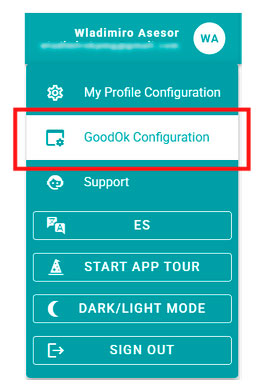
Depending on the services that are active, this section will display different boxes to allow the configuration of their elements.

It allows you to configure the following parameters:
The inactivity time before automatically logging out. The value to be entered is the number of minutes of inactivity in the application that triggers the user’s session to be closed. If zero is entered, the session will not be closed unless the user logs out manually or the browser tab is closed.
The number of days of Notifications to be loaded and displayed in the Dashboard and the Notifications List. This parameter allows you to specify the number of recent days, between 15 and 120, for which received notifications are shown when the user logs in. With this parameter, you can adjust the number of days to limit the volume of notifications loaded by default, which, if too high, may affect browser and application performance. If there is a very high volume of notifications (more than 1,000 notifications), it is advisable to reduce the number of days for which notifications are displayed. Older notifications can always be downloaded later if needed.
If the external authentication service is enabled, this section also allows you to configure whether external authentication is mandatory for all users or optional, so that when setting up an operator, you can choose between external authentication or GoodOk’s own authentication with username and password.
External Autentications
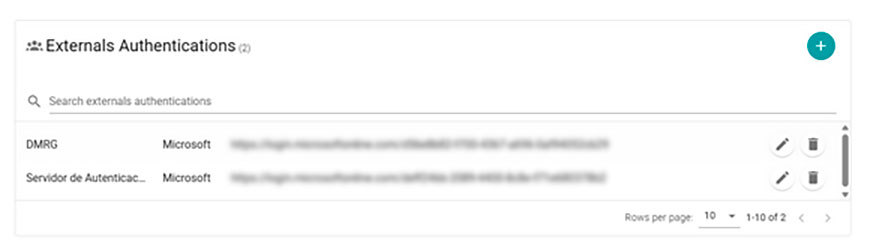
If the external authentication service is available, this section is used to configure the external authentication services.
The section displays a list of external servers. New servers can be added using the + button, and existing ones can be edited or deleted.
Servers that are currently being used in the configuration of any operator cannot be deleted. Before a server can be removed, it must first be unassigned from all operator configurations to prevent users from losing access to GoodOk.
Newsletter susbcribe
Receive all the news and updates about GoodOK in your email.